
In this article
- A button, an API, and our first prompt
- You made your product manager happy. Kudos!
- Our CSV button now needs a memory
- It works, but…
- Our little AGENTS.md file isn’t so little anymore
- So, what’s the next step? Delete AGENTS.md?
- Oops, an export alert fires.
- Let’s extract it while the investigation is still fresh
- We wrote the steps down. Why are the runs still different?
- Are we all set? Wait, I heard about MCP too.
- Try it without you sitting next to it
- So, should I write the code or the skill first?
If you’ve been working with coding agents, which I imagine many software engineers reading this have, you’ve probably come across the word “harness.”
“Oh, another cliché blog post explaining what a harness means.”
No, no. Not this time. I’m a little tired of the jargon too. But the new things aren’t stopping. Every day, every night, people are building something. And by “people,” I really mean almost anyone now.
I remember building my first blog website about ten years ago and naming it “Software Development Is a Piece of Cake.” Quite honestly, I was wrong. But maybe today it is. Or at least, getting something built can feel that way.
Anyway, the things keep coming. Go to sleep, wake up, and there’s another skill, another framework, another tool promising to make you ten times more productive. By lunchtime, it feels like it already has 80K stars on GitHub and is the hot topic in every guild. And the little nerves in my brain start crying, “Damn it, one more thing.”
I have to admit, I miss spending weeks reading technical books the old-school way. Now it feels like we don’t have time for such things. Am I wrong to think it should actually be the opposite? Isn’t AI supposed to give us more time?
Instead, it feels like you have to build something or learn about something other people have already built, all at the pace of a 100-metre sprint. And if you enjoy running marathons, oh, you can end up quite far behind the curve. These days, that sends my anxiety through the roof.
Even the relevance of your past experience can start to feel questionable. Skills, harnesses, models: something new almost every day and every night. And hey, even Git isn’t staying out of it: Anthropic has built its own in-house version control system and migrated its monorepo away from Git.
If someone reads this blog post in 2030 and asks their agent (perhaps actually talking to it this time) what Git means, I won’t be surprised anymore. I mean, maybe that’s also fine. I learned programming with SVN. But things are definitely moving faster. Interesting times we’re living in. Recently, I’ve been reflecting on all of this.
After that little heart-to-heart, let’s get back to the topic. Thanks for listening; I already feel better.
What were we saying? Everyone is building something, which is great. I obviously have no problem with that. Some people are starting a company, some are making a mobile game, and some are even building their own personal agent. Many things are moving at the same time.
If you’re a corporate employee like me, you’re supposed to spend most of your working time on work. And I’m pretty sure your company won’t be particularly happy about the fancy game you built in two hours, unless you happen to work at a game company.
Obviously, there are still plenty of things to build. You could create a new test framework for your team, or even a chatbot that answers your stakeholders’ questions. But for now, let’s say you just want to implement that two-story-point ticket your product manager really wants done.
Even then, you have different options. One is to pick up the task, start your agent loop, and try to get something done while your agent gets on your nerves. Another is to be a “perfectionist” and focus on the perfect setup first.
Before starting, one more skill. Another MCP connection. A few more plugins. Maybe some policies. Perhaps that fancy thing released this morning. That’s an investment, though. Maybe spending five hours on it today will halve the lead time for the next ticket. If you have the whole day, you might think, “Worst case, I’ll fall back on the agent loop with prompts.”
That’s a fair dilemma, and I really don’t think there’s one right answer or a one-size-fits-all solution. I was having it myself, and I don’t think I was alone.
Because of the nature of my role and responsibilities, taking a requirement all the way to “done” is something I fit around my main work. Personally, I enjoy it. I might have a clear task and a clear but limited window, perhaps only two hours a day, which can still be enough for an agent loop on a small, well-scoped task.
On the other hand, I’m continually hearing about different setups from everywhere. It feels like everyone has fancy sneakers while I’m walking barefoot, which isn’t a particularly nice feeling. But trying to be fully equipped is endless. Believe me, you won’t reach the finish line.
Recently, I had a difficult conversation with myself and stopped, or at least tried to stop, worrying about my setup. I wanted to get things done and enjoy the journey instead of trying to make the journey perfect. A famous internet meme actually helped me make that decision too. Not quite the same thing, but funny nonetheless.
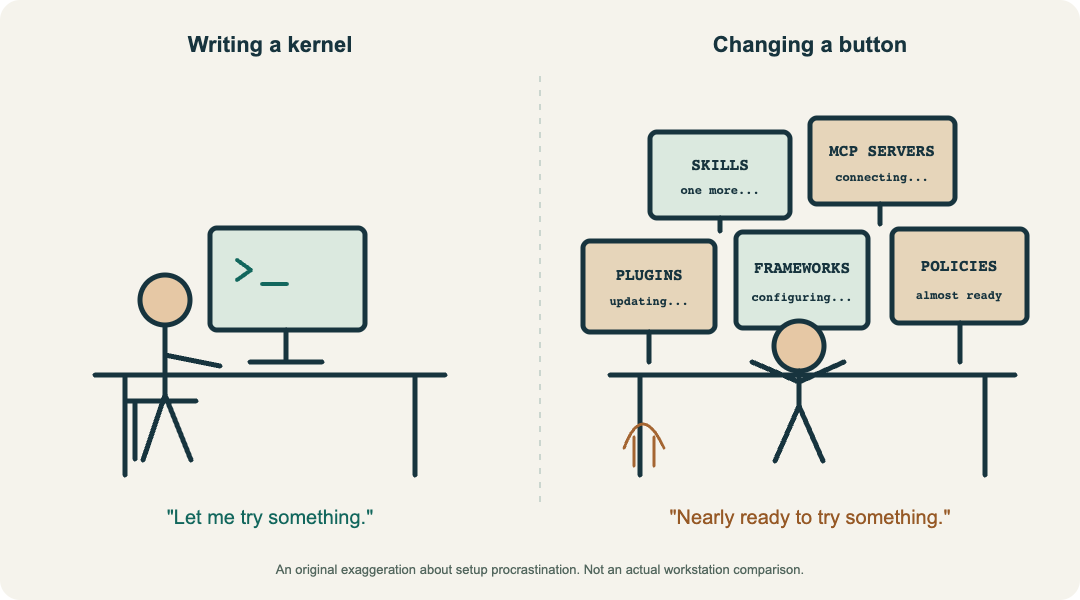
My agent drew this. There was actually a better one on the internet.
A few months after that decision, I think I was partly right and partly wrong. In this post, I’ll reflect on it. Enjoy!
Let’s imagine you’re a software engineer and your team is responsible for an internal tool at your company. Nothing particularly exotic: a user interface showing some sales metrics, such as revenue and the number of orders, and a backend supplying the data.
One day, your product manager comes over with a request:
“The users want to download the data from this page. Could we add a CSV button?”
A button, an API, and our first prompt
A fairly ordinary task. The button should call an API, the backend should generate the CSV, and the browser should download it. You open your coding agent and explain what you need. Since the agent doesn’t know its way around the project yet, you give it a few directions too.
Our first prompt
~/report-app · coding agent

❯ Explore the codebase. Add a button on the main page beside
  the sales metrics. It should call an API that generates a
  CSV, then download the file. Make it user-friendly. All
  tests must pass. Implement both the frontend and backend.
  The backend is in services/report-api/. Follow the project's
  coding standards, write clean code, and avoid unnecessary
  comments. Follow the project's existing API design principles.
The agent explores the repository, finds the sales metrics page and the backend, and looks at the existing API patterns and tests. It makes a plan, adds the button and endpoint, and connects the download. Then it runs the tests, reads any failures, and tries to fix them.
Perhaps it picks a component you don’t want, so you point it to the existing one. Perhaps “user-friendly” turns out to need a little more explanation. You go around once more. This is basically the agent loop, and eventually, you reach a point you’re happy with.
Then comes code review and a few iterations with the team. Perhaps they notice some “dummy” tests that only test the test setup, or even the mocks. Huge docstrings above every function. Interesting “pragmatic” decisions.
You’re unhappy, but that’s more or less expected. Okay, you still have time, so you iterate. Now you’re a bit annoyed with your agent. It has disappointed you a little. You were very clear about your expectations. Or at least, you thought you were.
A few more agent loops, and finally you get the thumbs-up. Your code is merged. It’s functional and working.
You made your product manager happy. Kudos!
The button works. The users like it. New day, new tasks. You have another refinement meeting, and your product manager is still interested in the CSV functionality.
“Some users want all the fields. Others only want the sales metrics they see on the screen. Can we give them a choice?”
“Sure.”
With enough time and resources, anything is possible. Well, at least within the scope of your tool. Here, those resources might be your tokens and your agent. Once again, you’re ready for another agent loop. You open a new conversation and start typing:
Our second prompt
~/report-app · coding agent

❯ Now extend the CSV export so users can choose between all
  fields and only the sales metrics shown on the screen.
  Review the previous PR and apply what we learned there.
  Make sure the code is clean and functional, follows the
  project's coding standards, and avoids unnecessary comments.
  Implement the changes in both the frontend and backend.
  If the API needs to change, follow the existing API design
  principles. Make sure the feature is user-friendly and all
  tests pass. No hacks, no shortcuts.
Hang on. Didn’t we explain most of this last time?
The new feature is the export choice. We’re also asking the agent to review what we learned in the previous PR. Most of the remaining instructions look familiar: clean, functional code, coding standards, no unnecessary comments, frontend and backend together, consistent API design, a user-friendly result, and passing tests. We’ve even added “no hacks, no shortcuts” for good measure. I presume that’s coming from the frustration of the code review comments last time, but who knows.
Before starting another round, hopefully a better one this time, let’s pause. Are we starting to repeat ourselves in the prompts, and perhaps in the follow-up messages during the agent loops too?
As software engineers, we don’t like repeating ourselves. The rule of three, popularized in Martin Fowler’s Refactoring and attributed to Don Roberts, suggests refactoring when you do something for the third time. We’re only on our second request here, but it’s obvious this won’t stop. With every new feature and every new session, we’ll repeat ourselves again and again.
Typing a few sentences into the terminal might not be particularly annoying, though. It’s a few sentences. If you’re fast enough on the keyboard, maybe that’s fine. But what about the loop?
If you reached the perfect solution with the first prompt, maybe you could accept that as a trade-off. But with our first requirement, you already had a hard time with your agent. You had to give it more instructions, several times. Then, during code review, you became even more frustrated because the result wasn’t what you’d asked for. Or, to put it more accurately, it hadn’t been implemented in a way you’d be happy with.
That worries me more than typing the same sentences. If “use the learnings from the previous PR” doesn’t work, we might repeat the whole experience: the same mistakes, the same explanations of our expectations, and then another iteration. That’s a much bigger repetition than a few lines in a prompt.
So, do we have a better option?
Let’s first look closely at the two prompts and try to understand how they worked: what went well, and what didn’t really work as expected. Maybe a small retrospective on our prompts.
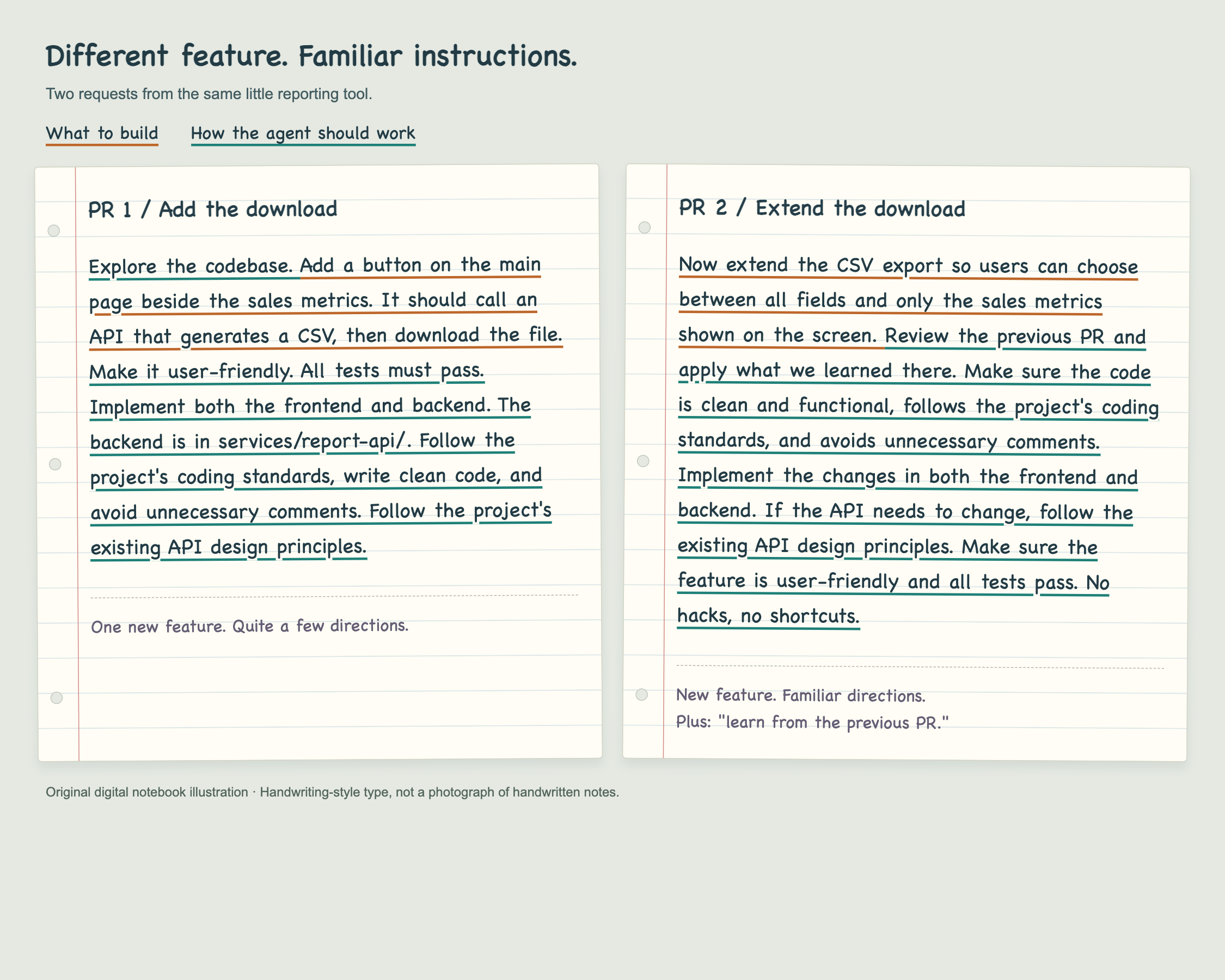
The pattern is quite obvious. We have functional requirements, and we have instructions to the agent. Some instructions repeat; some are new. And we’re hoping they’ll work. A third prompt will probably have us repeating ourselves once more. Can we do better than that? Maybe these recurring instructions need a better home.
This is where AGENTS.md comes into the picture. The AGENTS.md project’s own description calls it a “README for agents”: a predictable place to provide context and instructions for working on a project. The folks at Anthropic describe the same purpose in their project-memory documentation: persistent project instructions, covering things like coding standards, workflows, and project architecture. Their familiar filename is CLAUDE.md, and current Claude Code versions can also read AGENTS.md, with some conditions.
That sounds quite close to what we’ve been looking for. We write down the guidance once, keep it with the repository, and let future sessions load it instead of relying on us to type it again. But “regardless of the tool” needs a small asterisk:
- GitHub Copilot CLI, Codex, OpenCode, and Pi support
AGENTS.mdas a source of instructions. Where they look and how they combine files differ. - Claude Code supports reading
AGENTS.mddirectly from version 2.1.277. By default, an applicable projectCLAUDE.mdorCLAUDE.local.mdtakes precedence. We can configure it to read both, or importAGENTS.mdfromCLAUDE.md.
So we can reuse the guidance across these tools, but we still need to check that the file actually loaded in the session we’re using. Having it in the repository doesn’t mean every tool, version, or configuration will read it in the same way. And being in the context doesn’t guarantee the agent will follow every instruction correctly. We still need to check the work.
Now, how does this apply to our little CSV feature? We’ve already marked the recurring instructions in the notebook. Let’s put them on a whiteboard and give them a more useful structure.
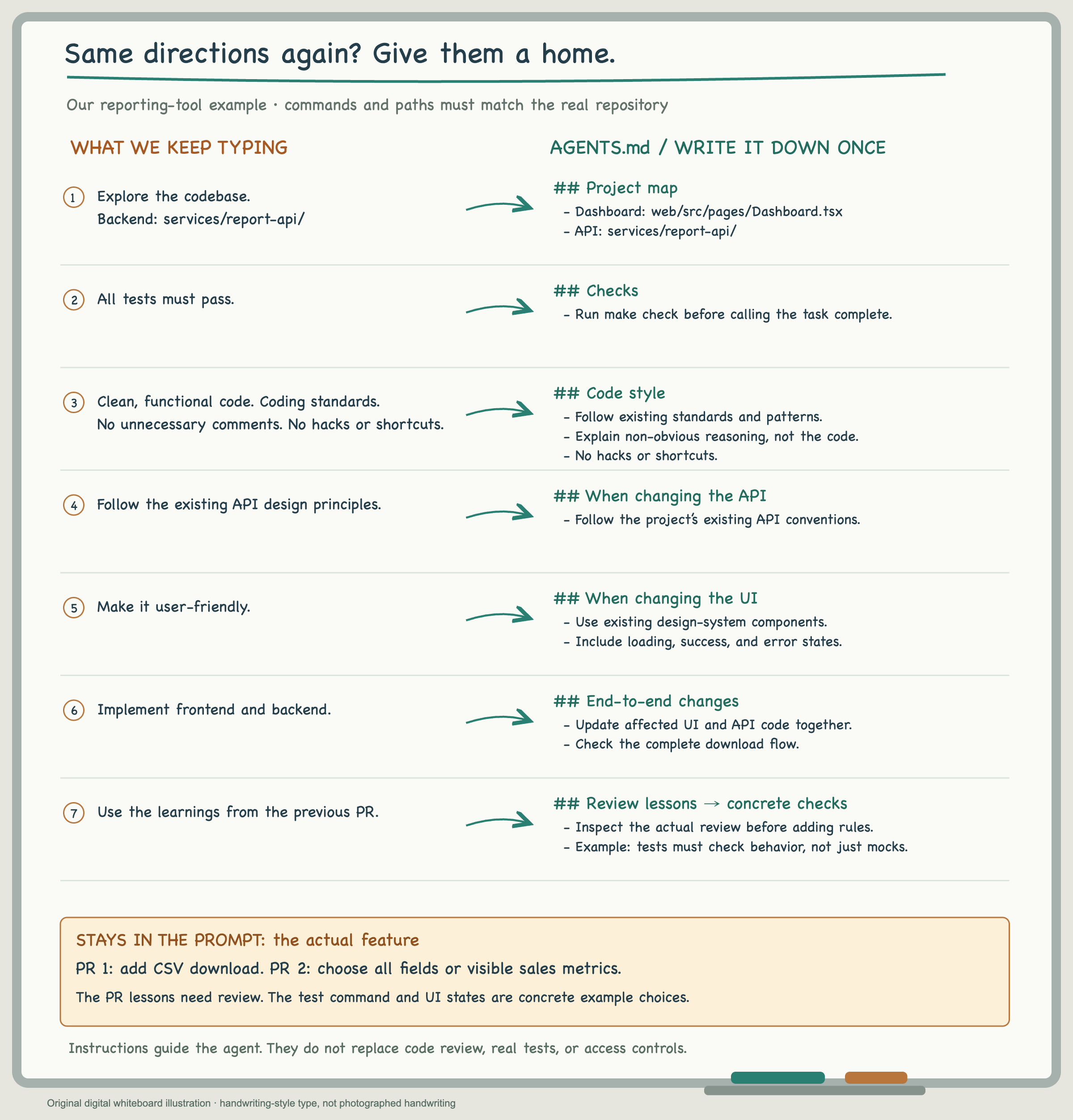
AGENTS.md — now let’s see what it looks like
## Project map
- Dashboard: web/src/pages/Dashboard.tsx
- Design system: web/src/design-system/
- API: services/report-api/

## Checks
- Run make check before calling the task complete.
- Tests must check observable behavior, not just the test setup or mocks.

## End-to-end changes
- Update affected UI and API code together.
- Check the complete download flow.

## Code style
- Follow the project's coding standards and existing patterns.
- Write clear, maintainable code.
- Comment when the reasoning needs explanation, not to restate the code.
- No hacks or shortcuts.

## When changing the API
- Follow the project's existing API design principles.

## Boundaries
- Ask before adding dependencies.
- Do not access the production database or its credentials.

## When changing the UI
- Use existing design-system components.
- Include loading, success, and error states.
Our CSV button now needs a memory
Let’s go back to our realistic-enough team. Unsurprisingly, there’s another requirement for the CSV feature.
“Could users see their previous exports and download an older version?”
That’s a reasonable request. To make “version” clear here, we mean a saved export from a particular point in time, not a new version of the CSV format. If the sales data changes tomorrow, yesterday’s download should still contain yesterday’s exported data.
For our example, we decide to keep each generated file and store a record of it: an export ID, when it was created, the options used, who requested it, and where the file lives. That gives us a reason to change the data model. A filename alone isn’t quite enough for the history page we want to build.
Before opening the next session, you look at AGENTS.md. We’ve written down the coding conventions, but this is new territory for our agent. Where are the models? How do we create a migration? Which database tests should run? How do we check the database if a user tells us they can’t see last week’s export in the interface?
It’s now clear that our agent, and particularly the instructions in AGENTS.md, isn’t fully equipped for this changed world. So we add the database instructions to AGENTS.md. Once we enter an area, it’s better to cover it properly. We also explain how to test changes with a local database and, if needed, troubleshoot in a staging environment. Personally, I wouldn’t give my agent production database access, even read-only.
Now we’ll do two things: give our agent the relevant guidance through AGENTS.md, and write a prompt for the actual requirement.
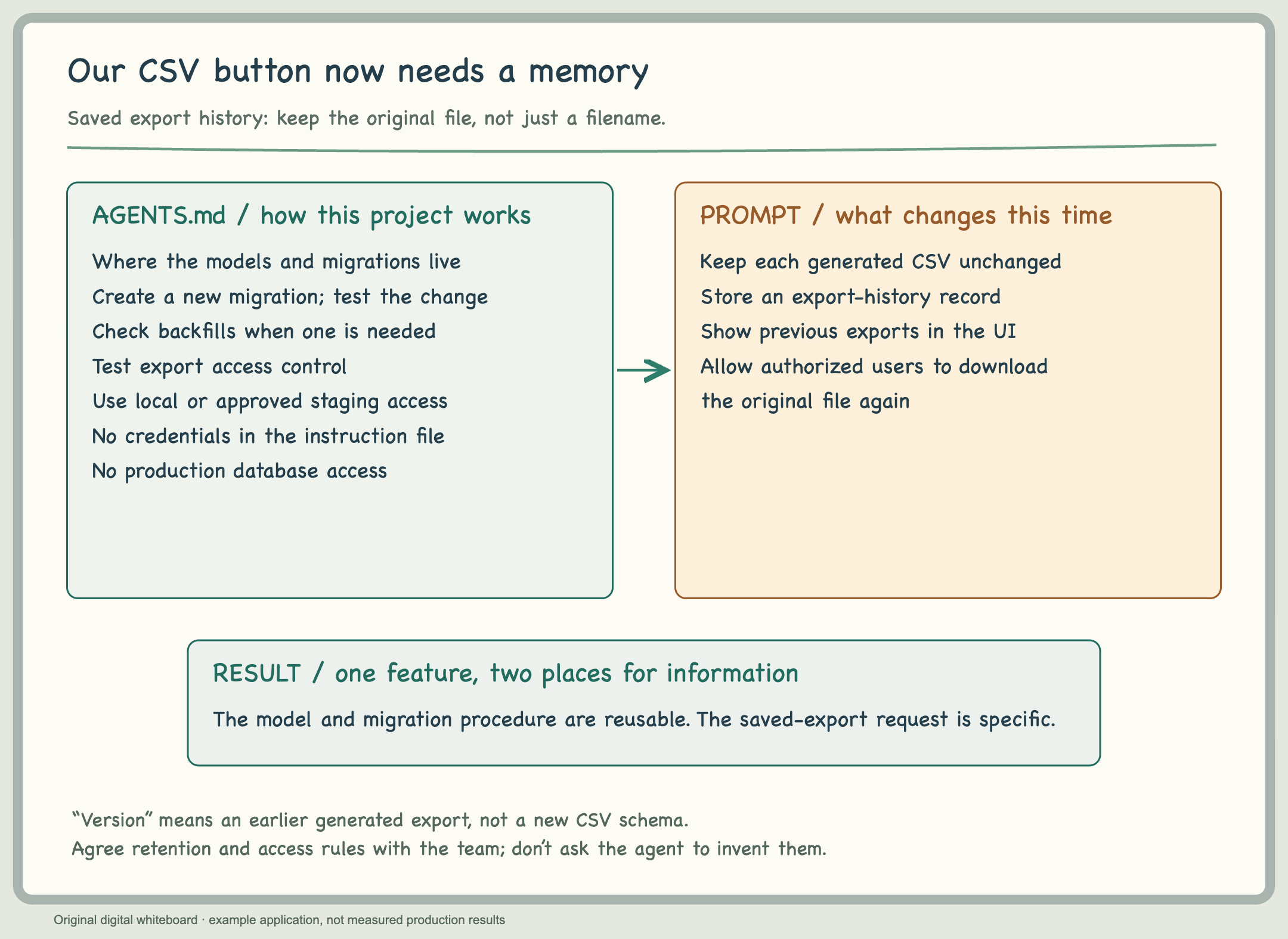
The new part of AGENTS.md — example conventions
## Database changes
- Models: services/report-api/app/models/
- Migrations: services/report-api/migrations/
- Create a new migration; don't edit one already shipped.
- Test schema changes and any required backfill.
- Test access control for stored exports.
- Use the documented local setup or approved staging access.
- Never put credentials in this file or access the production database.
Our next prompt
~/report-app · coding agent

❯ Keep generated CSV exports so users can see their export
  history and download an earlier file. Store the metadata
  needed for the history page, keep the original file unchanged,
  and ensure users can only access exports they're allowed to see.
  Implement the history page and the backend support.
It works, but…
We finish the requirement and get a thumbs-up from a team member. Congratulations, one more done. Everything looks great. We deploy it to production, test it, and it works perfectly. Case closed. Or is it?
Maybe two days later, a stakeholder comes over and says, “Hey, it stopped working.” Now we have an incident. We fix the problem, then run the postmortem. As we work through the endless “why” questions in the root-cause analysis, we notice something important that we missed. Oh, damn. Observability.
At that point, you’re a little disappointed with your agent. But perhaps some of that is on us too. We hadn’t made the monitoring expectations explicit, and we didn’t catch the gap during review either. In this run, the agent didn’t raise it for us. I wouldn’t turn that into a claim that agents can never suggest monitoring, but I certainly wouldn’t rely on a suggestion appearing every time.
So we go around again. This time, we explain where the instrumentation belongs, how this service names its metrics, and where the alerts and service-level objectives live. A service-level objective, or SLO, is the reliability target we agree to measure. We still need to decide that target rather than let the agent pick a convincing-looking percentage.
Of course, a good amount of this explanation goes into AGENTS.md too.
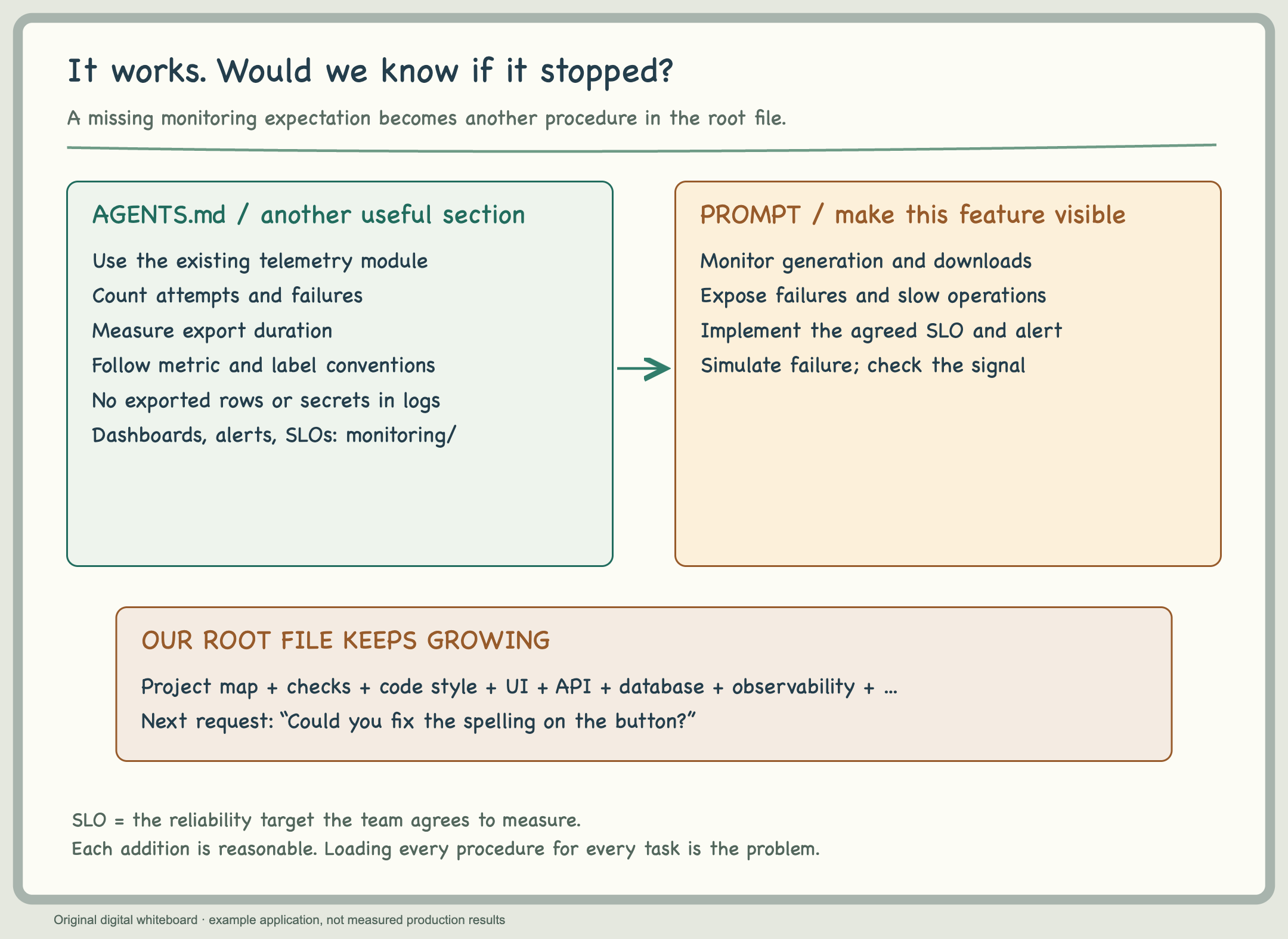
Another section for our growing file
## Export observability
- Use the service's existing telemetry module.
- Record export attempts, failures, and duration.
- Follow existing metric names and label conventions.
- Never log exported rows, credentials, or personal data.
- Put dashboards, SLOs, and alerts in monitoring/.
- Use the team's agreed target and alerting conventions.
- Verify the instrumentation and alert behavior.
And another prompt
~/report-app · coding agent

❯ Add monitoring for CSV generation and saved-file downloads.
  Make failures and slow exports visible, and add the SLO
  and alert using the reliability target we've agreed on.
  Verify that a simulated failure produces the expected signal.
So far, each addition has a perfectly reasonable explanation. We’re recording things we actually needed. That’s what we wanted, right?
Our little AGENTS.md file isn’t so little anymore
Follow this path for a while and we can end up with a very fat AGENTS.md. UI rules, API conventions, migrations, database troubleshooting, storage, monitoring. All useful. But not all useful for every task.
The first cost is context. In the setup we’re describing, the root instruction file is loaded at the start of the session. Its contents take space before the agent reads the code or our new request. This also contributes to the input-token count. Over time, you may notice higher token or credit usage, even with the same prompts and loops. The billing impact depends on the host, pricing, and caching; taking up context space isn’t the same as being charged the full input rate each time.
Then there is the conversation itself. Code, test output, our corrections, another tool result. With more space occupied from the beginning, there’s less left for the work before context management is needed. With the same context limit and a comparable workload, that can bring compaction sooner. Probably not what you were hoping for. But wait a second. What actually is compaction?
Compaction is how the agent keeps going when the conversation gets too large: older material is cleared or summarized so the next steps can fit. That is useful. Otherwise, we’d hit the limit and stop. But a summary isn’t a word-for-word copy of the conversation.
Perhaps we spent several messages explaining why a particular approach was wrong. After compaction, the decision may remain, but some of the reasoning or a small exception might not. Then we notice the agent going back towards something we already discussed, and we’re explaining it again. Not exactly what we hoped to fix.
This isn’t just my interpretation of what compaction might do. Anthropic’s Claude Code documentation says that detailed instructions from earlier in the conversation can be lost. Their context-engineering article also explains that overly aggressive compaction can lose subtle but important context. Compaction helps maintain continuity; it doesn’t guarantee that every detail survives.
Persistent project instructions aren’t simply the same thing as an old chat message, though. Moving important rules into the repository helps keep them available. The problem is putting every procedure there and loading it whether or not the current task needs it.
We’ve already described two big problems with fat AGENTS.md files. Now let me share the less scientific part: my own experience. As my instruction files grew, my sessions started feeling less effective. Maybe an easy way to think about this is to imagine a junior engineer joining your team.
Their accounts are finally ready, and they’re ready to work. As the team lead, you’re excited too. You want them to be productive on their first day, so you immediately start explaining everything: how to write code, every domain concept, the stakeholders, the policies, database access, migrations, monitoring, all of it. Maybe the junior engineer hasn’t even managed to configure the company proxy yet, but never mind, here’s the rest of the wiki too.
How does that look to you? Potentially inefficient? That’s how I interpret the situation too. Again, this isn’t a scientific explanation, just my own pragmatic observation.
So, what’s the next step? Delete AGENTS.md?
No. We’ve worked quite hard to learn what belongs in it. I don’t want to go back to explaining everything in the terminal 🙂
Instead, we’ll use progressive disclosure. In their context-engineering article, Anthropic describes this kind of just-in-time retrieval: keep lightweight pointers available, then retrieve the information when it’s needed.
But what does that mean in practice? Let’s go back to our example. We didn’t sit down one morning and decide to write a huge instruction file. We extended it with each requirement. The CSV button brought UI and API conventions. Saved exports brought database models, migrations, and access checks. Then the missing monitoring brought another set of instructions.
Each addition made sense when we added it. The problem is that we kept giving all of it to the agent, even when most of it had nothing to do with the next task.
So let’s go through the file and separate the things that belong together. We aren’t deleting what we’ve learned. We’re deciding which parts the agent should start with, and which parts it should open after understanding the request.
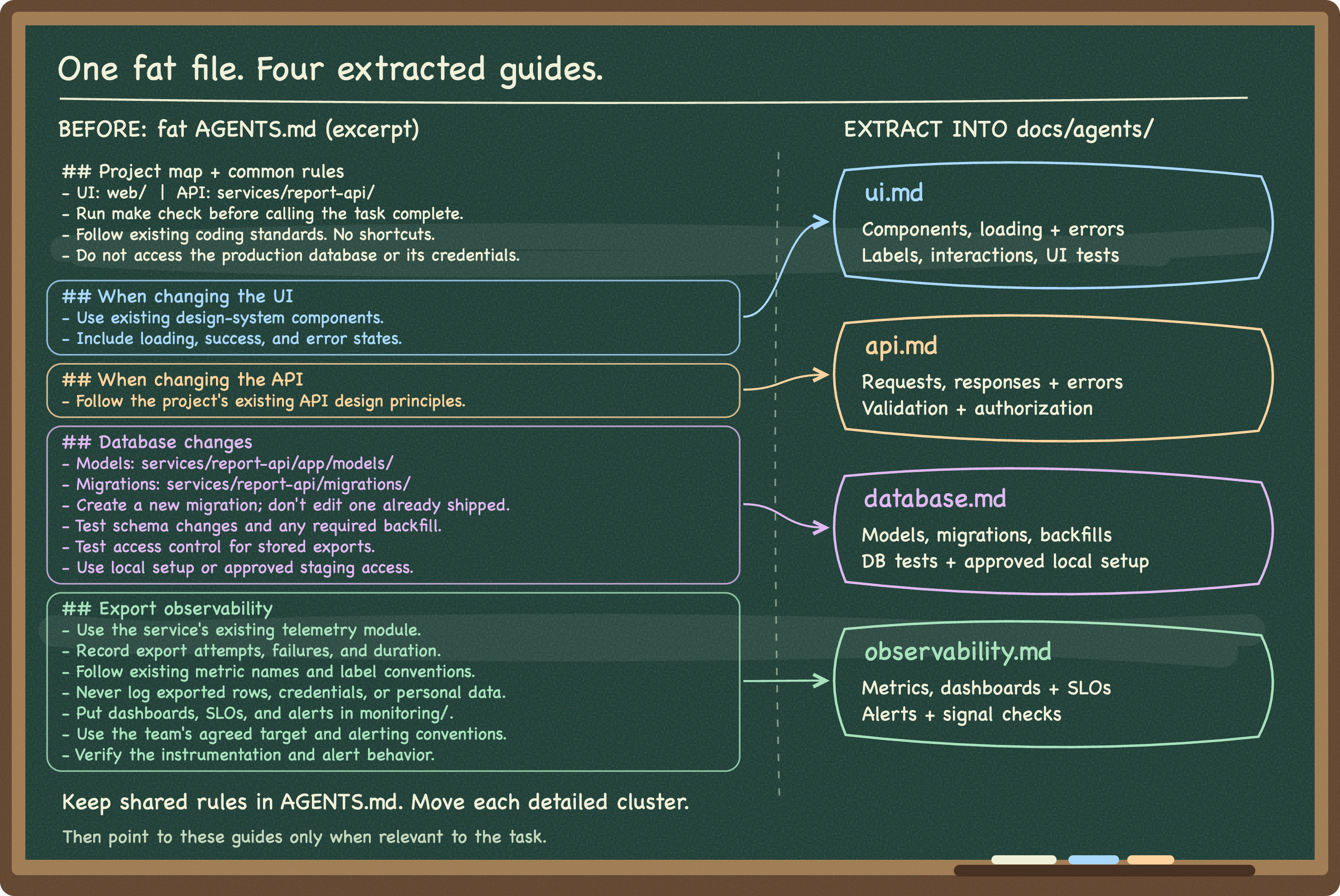
The project map, common checks, and shared boundaries stay in AGENTS.md. We want the agent to know where the application lives, how we check a change, and what it must not access, regardless of which feature we’re working on.
The detailed UI instructions move to docs/agents/ui.md: which components to use, how our loading and error states work, and which UI tests cover the flow. The API conventions move to docs/agents/api.md: how this project structures requests, responses, errors, and authorization checks.
The database material moves to docs/agents/database.md. That’s where we keep the model locations, verified migration commands, backfill considerations, and database tests. The instrumentation and alerting guidance moves to docs/agents/observability.md.
These are ordinary Markdown guides, like our earlier instruction file, AGENTS.md. Nothing special yet. Their names describe what we or our agent will find inside.
After that little cleanup, our main file could look like this.
AGENTS.md — the starting point, not the whole onboarding
## Project map
- UI: web/
- API: services/report-api/
- Monitoring: monitoring/

## Checks and boundaries
- Run make check before calling the task complete.
- Follow the project's coding standards.
- Ask before adding dependencies.
- Do not access the production database or its credentials.

## Read the details when the task needs them
- Before changing UI code, read docs/agents/ui.md.
- Before changing an API, read docs/agents/api.md.
- Before changing models, migrations, or backfills,
  read docs/agents/database.md.
- Before changing instrumentation, dashboards, SLOs,
  or alerts, read docs/agents/observability.md.
- If a task crosses these areas, read each relevant guide.
- Don't load unrelated guides just because they're listed.
The paths and commands still need to match our actual repository. This isn’t a universal file we can drop into every project. But it gives our agent a place to start, and clear directions for finding the rest.
Let’s continue with our realistic-enough team.
Looks like we have a bug
Our product manager spots a typo in the download button. They don’t need a new export option, a new endpoint, or a database change. Just fix the label.
~/report-app · coding agent

❯ Correct the spelling on the CSV download button.
  Keep its behavior unchanged.
At the start of this fresh session, our agent loads the root AGENTS.md. Then it sees the project map, the checks and boundaries, and the list of guides. It sees the path docs/agents/database.md; it hasn’t read the migration instructions inside that file just by seeing its name.
Then it identifies this as a UI change. Yes, agents are smart. Before editing the component, it reads docs/agents/ui.md. It can use the project map to find the relevant page and inspect the component and its tests. The UI guide supplies whatever this repository says about labels, shared components, and verification.
It changes the text, checks that the button still behaves as expected, and runs the required checks. We review the result.
What didn’t we need? The database guide, because no model or migration is changing. The API guide, because the endpoint and its contract aren’t changing. The observability guide, because we’re not modifying instrumentation or alerts.
So, for this example, the intended loading sequence is:
Session starts
  → AGENTS.md: map, shared checks, boundaries, guide paths

Task identified as a UI-label change
  → Read ui.md
  → Read the relevant component and tests

Not needed for this change
  → api.md
  → database.md
  → observability.md
The agent still gets instructions. It just doesn’t get our database onboarding before correcting a word on a button. That seems a more reasonable start to the morning.
Now this one is a feature, not a bug
Now the product manager comes back with something a little more interesting.
“People can’t tell their saved exports apart. Could they give each export a name?”
~/report-app · coding agent

❯ Let users name their saved CSV exports and show that name
  in the export-history page. Keep existing exports accessible.
  Implement the UI, API, and storage changes needed.
Again, the fresh session starts with the same root AGENTS.md.
The agent looks at the existing feature and works out which parts need to change. In our example, we decide the name should be stored with the export record, accepted and returned by the API, and displayed in the history page. Now three guides are relevant.
Before changing the model and migration, it reads database.md. That gives it the repository’s migration process and the checks for existing records. We still need to agree on what unnamed exports should show; a guide can’t invent that product decision for us.
Before changing the request and response, it reads api.md. That is where it finds our conventions for validation, errors, and authorization. Before adding the input and changing the history display, it reads ui.md for the components and states we expect.
It doesn’t need to read the three guides in one fixed order. It needs the relevant guidance before making the corresponding changes. The agent also reads the actual models, API handlers, UI code, and tests; the guides don’t replace understanding the implementation.
For this request, let’s say we’ve checked that the existing monitoring remains sufficient and no instrumentation needs changing. Then observability.md stays unopened. If the design does require a new metric or changes an existing signal, that part of the task becomes relevant and the agent should read the guide then. Progressive disclosure doesn’t mean refusing to load more information after discovering we need it.
The intended sequence now looks like this:
Session starts
  → The same root AGENTS.md

Task requires a stored export name
  → Read database.md before model and migration changes

Task changes the API contract
  → Read api.md before request and response changes

Task changes the export-history UI
  → Read ui.md before UI changes

No monitoring change in this example
  → Leave observability.md unopened
We’re loading more than we did for the typo, because this task needs more. That’s fine. The goal isn’t to make every session as small as possible regardless of the work. It’s to stop paying the context cost for details that have no reason to be there yet.
One practical caveat before we congratulate ourselves: these are the loading sequences we’re asking for, not guarantees produced by a Markdown filename. We need to verify the agent’s discovery behavior and inspect what the agent actually reads. If it loads every guide immediately, the instructions or configuration need another look. If it skips a relevant one, we need to catch that too.
Also, a conditional instruction to read a file isn’t the same as an import that eagerly expands it at startup. If our host automatically loads every referenced file, we’ve organized the text without reducing what enters the context. I’d check that before declaring our little refactor a success.
Now we have a shorter starting point, the same useful knowledge, and a way to bring the relevant parts into each task. No new plugin required so far. Let’s enjoy that for a moment 🙂
Oops, an export alert fires.
Our CSV history feature is working, and the guides are doing their job. A UI change leads the agent to the UI guide. A database change leads it to the database guide.
Then one morning, an export alert fires in production.
The agent knows our coding standards. It can find the models. The monitoring guide explains where we put metrics and alerts. But right now, we aren’t asking it to write code or add instrumentation. We want to find out why an export failed.
So we start another conversation.
“Investigate this export alert.”
The agent needs more than the name of our telemetry module. Which environment? What time window? Which export failed? Where is its status recorded? Which logs belong to that request? Did generation fail, or did the file get created but the download fail afterward?
We work through it together: check the dashboards, fetch the relevant logs through the service or monitoring API, and follow the request ID into the trace, if one is available. We compare the evidence before deciding what actually went wrong.
Some queries return too much, so we narrow them. The logs don’t contain the identifier we expected, so we check what the service actually records. Eventually, we have enough evidence to explain the failure. We also know what we couldn’t verify.
Let’s say the evidence points to a transient database failure, and we make the affected operation more resilient. So far, so good. But a few days later, another export fails. A different stakeholder, a different operation. Perhaps the earlier fix doesn’t cover this case, or perhaps it’s a completely different issue. We don’t know yet; we need to check. And of course, we’re going to use our agent again.
And there we are, explaining the sequence another time. Check the environment first. Don’t query the whole day. Retrieve the job status. Correlate the logs. Don’t decide that the database is the problem just because the error message mentions a query.
Do you also feel like Martin Fowler is coming for us? We’ve started repeating ourselves again. We need a way to give this workflow to our agent, but it doesn’t fit neatly under UI or database instructions. I don’t want every button-label change to start by reading how to investigate a production export alert.
We could write a runbook and link to it from AGENTS.md. That is still a valid use of progressive disclosure. But this material is now a procedure we want the agent to carry out: it takes an alert and an environment as inputs, gathers evidence through a sequence of tool calls, and produces findings with explicit gaps. It isn’t just background knowledge about the project.
That is a good candidate for a skill. Anthropic’s extension guide explicitly recommends capturing a repeatedly used playbook or multi-step procedure as a skill. And yes, we’ve started talking about another bit of agent setup: a skill.
So let’s call ours investigating-export-failures. It describes when to use it, what inputs are needed, how to gather the evidence, and when to stop. The service-specific API details can stay in references. Any checked, reusable query or log-fetching code can live beside the procedure, without putting credentials in the package.
For a spelling correction, none of those investigation steps need to load. For an export alert, the host can make the skill discoverable through its description, and the agent can select it. We can also invoke it directly, or keep it in the team repository so others can use it too. In Claude Code, once it’s installed in a supported location, that might look like this:
~/report-app · coding agent

❯ /investigating-export-failures Investigate this production
  export alert. Use the alert's identifiers and time range.
  Report the evidence and anything you couldn't verify.
Now we can change the alert without rewriting the investigation instructions. The procedure is reusable; the export ID, time window, and actual explanation will vary from case to case.
Notice that we haven’t moved beyond progressive disclosure into some unrelated mechanism. A skill uses progressive disclosure too. We’re giving an occasionally needed, repeatedly performed procedure a supported package and an entry point the agent can discover or we can invoke.
An ordinary runbook can also describe all these steps. If following that runbook already works well, we don’t have to convert it. The skill adds discovery, invocation, and a place to bundle the procedure’s resources. It doesn’t make the reasoning correct by definition, and it doesn’t guarantee that the same cause will explain every alert.
For me, the need here comes from repeating the investigation itself. We’ve done the work, learned which steps matter, and now want to use that procedure again without coaching the agent through it from scratch.
Let’s extract it while the investigation is still fresh
The session we just finished contains something useful: the calls that worked, the filters we had to correct, and the points where the evidence was incomplete. That is a much better starting point than asking for “the perfect debugging skill.”
The extraction prompt
~/report-app · coding agent

❯ Turn the repeatable parts of this export investigation
  into a skill called investigating-export-failures.
  Define its inputs, evidence-gathering steps, and stop conditions.
  Keep SKILL.md short; put API and log-query details in references/.
  Reuse only verified helpers and flag unverified commands.
  Don't copy this alert's IDs, findings, or credentials as defaults.
  Keep it read-only. Missing access must be reported, not bypassed.
We might end up with this structure:
.agents/skills/
  investigating-export-failures/
    SKILL.md
    references/export-service.md
    references/monitoring.md
Those references should contain the actual service contracts, approved access setup, and query conventions from our example application. We haven’t written an executable helper yet. If a tool already does what we need, the procedure can use that. We can add a script when we have a specific reason for one.
The start of SKILL.md
---
name: investigating-export-failures
description: >-
  Investigates failed or slow CSV exports by correlating
  export status, logs, and traces. Use for export alerts
  or a reported failed export. Not for implementing
  export features or changing monitoring configuration.
---

1. Confirm the environment, alert time range, and available
   export or request identifiers. Ask for missing inputs.
2. Read references/export-service.md and
   references/monitoring.md for the approved read-only
   tools and query conventions.
3. Retrieve the relevant export status and timestamps.
4. Fetch bounded logs and correlate request IDs with
   traces where available. Do not expose exported rows.
5. Compare the evidence from generation and download.
   Keep observations separate from possible causes.
6. Report findings with evidence and remaining gaps.
   If access or identifiers are missing, report the blocker.
7. Do not modify data, retry jobs, or access the production database.
The package needs real, working documentation at those locations. These are example contents, not a ready-to-install integration.
For project skills, Codex supports .agents/skills/, while Claude Code supports .claude/skills/. The invocation syntax and discovery behavior depend on the host too. We need to check that our skill is actually available, then test whether the right requests select it.
We can keep the coding conventions in AGENTS.md and the model and telemetry knowledge in their guides. The investigation skill uses relevant references to do a particular job. If database migrations later need their own reusable procedure, that can become a different skill. We don’t need to turn every guide into one at the same time.
Now we’ve captured something we genuinely repeat. But we’ve still only written instructions. Whether the agent will perform all the mechanical parts consistently is the next question.
We wrote the steps down. Why are the runs still different?
Let’s run the investigation skill on another production export alert. The broad procedure is the same, but when we look closely, the evidence gathering isn’t quite consistent.
In one run, the agent queries the alert’s time window and follows every page of results. In another, it fetches the first page of logs and starts explaining the failure. The first page contains an error, so perhaps that’s enough? Or perhaps the event that explains it is on the second page.
Hang on. Those aren’t the same investigation.
This is where I need to be careful with the word “deterministic.” Putting instructions in SKILL.md doesn’t make the agent deterministic. It still decides how to interpret them, which tools to call, and sometimes whether to load the skill at all. A numbered list doesn’t change that.
But parts of the procedure are mechanical. Validating the alert’s identifiers, using the requested time range, handling pagination, and recording which requests failed don’t need a new interpretation on every run. Once we’ve agreed on those rules, we can put them in a script.
An example command, once the script exists
~/report-app

$ python scripts/collect_export_evidence.py \
    --alert alert.json \
    --output evidence/
In this example, alert.json contains the production environment, export or request identifiers, and the incident’s time range. The script validates those inputs, then uses the existing read-only service and monitoring calls described in our references. It doesn’t connect to the production database, change records, or retry exports.
We define what complete collection means before writing it. Retrieve the export status and timestamps. Fetch the relevant log pages within a fixed result limit. Follow a trace identifier when one is available. Apply timeouts to the requests, and record which calls succeeded and which failed.
The output is a small evidence bundle with a collection summary. If pagination stops at our limit, the summary must say the results are incomplete. If a service is unavailable or an identifier is missing, that must be visible too. An empty response isn’t automatically proof that nothing happened.
Now the agent doesn’t have to reconstruct the same API calls and pagination handling during every incident. It runs the collector, reads the summary, and then reasons about the evidence. If collection is incomplete, it reports the gap or asks how to proceed; it doesn’t quietly turn a partial log sample into a confident root cause.
The script still needs testing. We can use fixed API responses to check that it follows pagination, preserves the requested time range, handles empty results, and reports timeouts. Those tests can verify the collection logic without creating an export or changing production state.
Even then, I wouldn’t promise the same evidence on every run. Logs can arrive late, records can change, and a service can become unavailable. The repeatable part is the collection logic and its explicit success and failure conditions. The cause of the incident still needs investigation.
We can add the collector to the skill and replace the mechanical instructions with its verified command. The references explain the inputs and output, while the skill describes when to run it and how to interpret the result. We aren’t asking the model to improvise a little API client each time an alert fires.
That still doesn’t force the agent to run the script. We need to test that the skill actually uses it. Where something must happen on every matching event, an enforced workflow or a supported command hook may be appropriate. Claude Code’s hook documentation describes that mechanism, but a hook only covers the events it actually intercepts. “Always run this” in Markdown remains an instruction, not an enforcement mechanism.
So we have a useful separation: the skill describes the investigation and the decisions; the script implements the agreed evidence-collection steps; the execution environment enforces access restrictions. The script makes those mechanical steps more predictable. It doesn’t make the agent’s diagnosis correct by definition.
Are we all set? Wait, I heard about MCP too.
Of course there’s another acronym. We started with a download button, remember? 🙂
Let’s return to our production export incident. Our investigation needs the job status and logs, but those live outside the repository.
Before installing anything, I would ask what access we already have. Perhaps the service has an approved command-line tool that returns the status and relevant logs. If the agent has shell access and can run that tool with the right permissions, that may be all we need.
If there’s no CLI but there is a suitable API, a small reviewed client can call it. The client can handle authentication through the approved environment, bound the time range, filter the output, and return the fields we need. The skill can say when to use it. We don’t need another protocol just because an HTTP request is involved.
For one known workflow in one repository, I would happily start there. The API calls are already defined, the output can be kept small, and the team can test the client like other code. Credentials still stay out of prompts and instruction files.
Now imagine the investigation grows. We need job data from our service, traces from monitoring, and related incidents from a ticketing system. Several teammates want to run it from different agent applications. We’re maintaining separate integrations for each client, and people keep asking which tools are available.
That’s a situation where I would look at MCP, especially if the services already provide maintained servers we can use.
The Model Context Protocol gives compatible AI applications a common way to discover and call tools, and access resources and prompt templates exposed by servers. A server can wrap an existing API; it doesn’t replace the API underneath. It also doesn’t write the investigation procedure for us.
Our investigation skill might say: identify the failed export, retrieve its status, inspect the relevant trace, and compare the evidence before suggesting a cause. An approved MCP server could supply the monitoring tools used in those steps. The same skill could instead call a CLI or our API client. We choose the access mechanism that fits the environment.
The same investigation, different ways to reach the evidence
Skill → approved CLI → job status and logs
Skill → reviewed API client → job status and logs
Skill → MCP client and server → job status and logs
The skill describes the work. The tool connection provides access. Any of these still needs appropriate permissions.
So this isn’t really “MCP versus skills.” They do different jobs. And “API versus MCP” isn’t a completely separate choice either, because the MCP server may call that API for us.
For a small, fixed job with a good existing CLI or API client, adding a server might be extra maintenance without much benefit. For reusable tools across compatible agent clients, a maintained MCP integration may be useful. Then we have to account for its deployment, authentication, exposed operations, and the output it sends back, just as we would with any other integration.
MCP isn’t automatically safer, cheaper, or more accurate than a CLI. A broad shell credential is risky; so is an overpowered MCP tool. For our investigation, I want the approved read-only access, a bounded query, and no exported customer rows dumped into the conversation. Returned logs and tickets are evidence, not new instructions for the agent to follow.
And I still wouldn’t give the agent production database access just because we’ve put a skill and an MCP server in front of it. The credentials and execution environment enforce that boundary. The Markdown doesn’t.
At this point, I can explain why each piece is there. The guide keeps detailed knowledge available. The skill packages a procedure we repeat. The script gives an agreed check a precise implementation. The CLI, API client, or MCP server gives us the access that procedure needs.
That feels quite different from installing another connection because someone posted a screenshot of their setup this morning.
Try it without you sitting next to it
At this point, our setup looks quite respectable. Before we celebrate, I would open a fresh session.
Does the skill appear? Does an export-failure investigation select it? Can the agent find the reference guide and run the commands? Or did it only work because our earlier conversation supplied half the missing information?
If it never gets selected, I would check whether it’s actually available and whether the description uses the words we use in real requests. If it gets selected for everything, the scope probably needs narrowing. Calling it explicitly can help test the procedure separately from testing whether the agent discovers it.
Then we look at the work itself.
| We ask for | What we expect | What we check |
|---|---|---|
| A production export alert | The investigation skill is used | Bounded status, log, and trace evidence; clear gaps |
| A button-label correction | No investigation skill | No unnecessary service queries or database access |
| An explanation of the table | An explanation, without writes | No migration or write operation |
| A log query with several pages | Complete or explicitly bounded collection | Later pages are fetched, or truncation is reported |
| A monitoring API timeout | An honest account of the blocker | The missing evidence is reported; no invented diagnosis |
I would also try the tasks without the skill. If the agent already does them correctly, what is our extra guidance improving? Every skill adds something to maintain, and even an unused skill’s description can take up space in discovery.
Finally, ask a teammate to run it in a clean session. Personal paths, missing dependencies, and unmentioned permissions tend to become obvious quite quickly that way. If another model or environment is supposed to support it, test there too.
A procedure can stay personal if it’s only useful to me. If it belongs to this repository, we can review it with the code. If several repositories need the same maintained package, a shared plugin may make sense. But someone has to own the updates, and we shouldn’t be sharing credentials or sensitive examples along with the instructions.
I don’t want to solve my own repetition by giving the whole team a new maintenance problem.
So, should I write the code or the skill first?
In this example, I’d start with the task. Use the agent, work through the awkward parts, and notice what keeps coming back. By the third time, I should probably extract it. Sometimes twice is enough to see the pattern.
That doesn’t mean starting from scratch when a good procedure already exists. Use it. It means I don’t need to build my own complete system for imaginary future work before trying the actual task in front of me.
The second request showed us what we kept retyping. The database work showed us which steps belonged together. The repeated investigations showed us where a script could make evidence collection more predictable, and which external tools we needed.
By then, we could explain why each part of the setup was there. That is a much more comfortable place for me than feeling I need to install everything because I might be missing out.
The free peanuts are still tempting. But I’d quite like to eat the ice cream before it melts 🙂
See you in the next post!


2 thoughts on “To Harness or Too Much Harness?”
Comments are closed.